Is this accounting software?
No. GrainPosition tracks contracts, grain inventory, delivery windows and crop position. It doesn’t replace your bookkeeping, your accountant or your farm accounting package, and it won’t try to. What it does is hand them the figures: for any calendar year, one download has every settlement with each deduction (check-offs, freight, drying and the rest) in its own column, the costs you recorded, a Date, Description, Amount list most accounting software can import, and a summary by crop.
Is it farm management software?
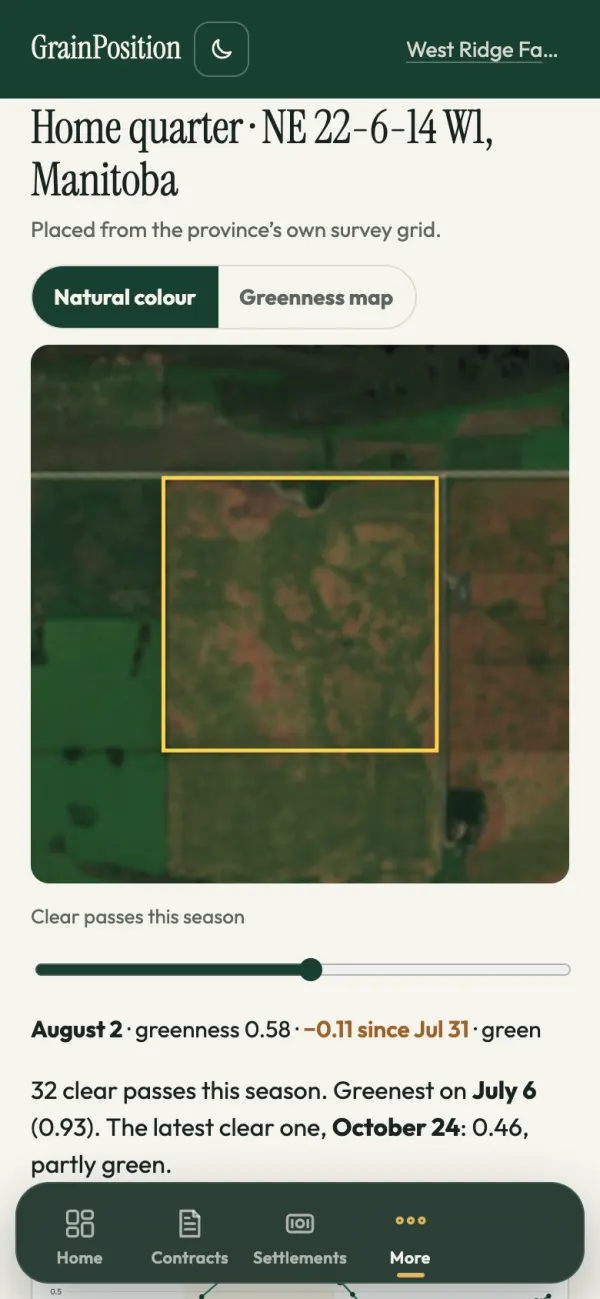
Yes, for grain farms. It keeps your fields (on a satellite map, with their crops, acres you can measure on the map, yields and recurring weaker-growth patches to scout), the field work done on them and who did it, your bins, your contracts, loads and settlements, and your costs, with the margin on each field and crop. It also keeps equipment hours, service intervals and repair records. Accounting and payroll stay in your accounting software.
Does it work on my phone from the truck?
Yes. Use GrainPosition in your phone, tablet or computer browser and sign in to the same account for your saved farm records. On a phone, you can add it to your home screen (how to add it). The Android app is in review on Google Play and the iPhone app is coming soon. The sample farm works in the browser too.
Can I check a settlement without an account?
Yes. On the free settlement check, take a photo or open a PDF of a grain settlement. It's read in about 20 seconds and every line is explained, with whether it adds up to the net printed, whether the buyer is on the Canadian Grain Commission's licensed list and how long payment protection lasts. Add the contract's photo and the price, grade and freight are checked against it. Nothing is stored, and a few free checks a day are allowed from each connection.
Does it check my settlements?
Yes, in the app. Photograph a settlement and it is matched to its contract and the scale tickets it pays for. Each line is explained or flagged for checking: a grade below the contract, with, for farms in Western Canada, the last day to ask the Canadian Grain Commission for a binding grade; weight your tickets’ dockage doesn’t account for, or shrink beyond the water drying takes out of tough grain (at a licensed elevator the shrinkage allowance is zero); a drying charge on grain your tickets show dry; an empty truck that weighed more than its usual on a ticket, beyond what the scale's legal tolerance and fuel or mud explain; a grade paid below every sample of that crop the Grain Commission's free Harvest Sample Program graded for you; freight that doesn’t match the contract’s rate; or a charge that isn’t on the contract. You can mark a line as agreed, and there’s a short message ready to send the buyer about anything still open. The dashboard adds up what still needs checking across the crop year’s settlements. The Settlements tab sets your buyers side by side from your own settlements: price paid, deductions and net per tonne, days to pay, how often the grade came in below the contract, dockage and what didn’t match, with every deduction for the year added up by kind. Check-off rates aren’t checked yet.
Does the app keep track of my deadlines?
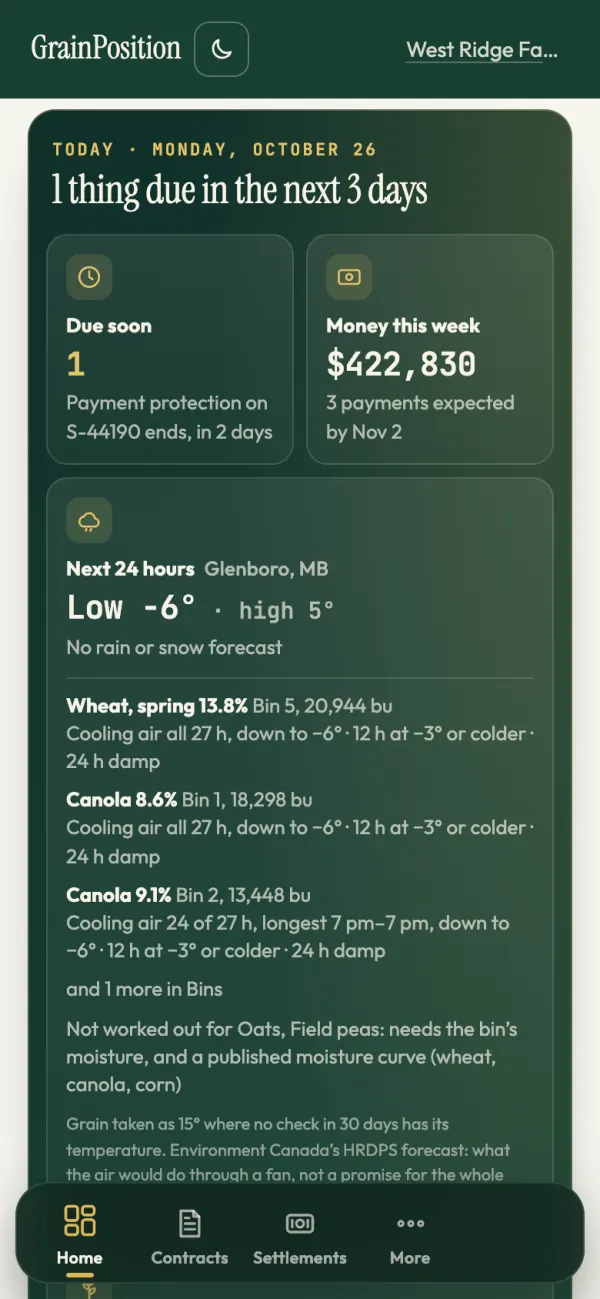
Yes, on the dashboard, under Coming up, soonest first: for farms in Saskatchewan, Alberta and Manitoba, the crop insurance harvested production report (SCIC and AFSC by Nov 15, MASC by Nov 30) with your harvest and bin figures to fill it in from (without an account, the free bin tally adds up every bin from a tape measure, by crop and field); the last day to ask the Canadian Grain Commission for a binding grade on a settlement graded below its contract; when payment protection ends on a settlement not marked paid; the Harvest Sample Program’s last day for samples; and each contract’s delivery window closing with grain still to deliver (and for 30 days after it closes). Farms in Ontario get Ontario’s rules instead: when a licensed dealer must pay (10 business days after delivery), the last day to claim from Agricorp’s Grain Financial Protection Program if it doesn’t, the 60% due on a delayed price contract, and Agricorp’s yield report dates. Mark each one done, or ignore one that doesn’t apply to you. It doesn’t file anything for you. Owners and family can opt into the Monday email with what’s due in the next two weeks, and can turn on morning alerts: one email on a day a delivery window, a bill or the end of a settlement’s payment protection comes within the days they pick, the Grain Commission posts a notice about a buyer they have grain or money with, a field in Fields greens less from space in June or July, or a crop reaches their target price, each alert once.
Does it show grain prices?
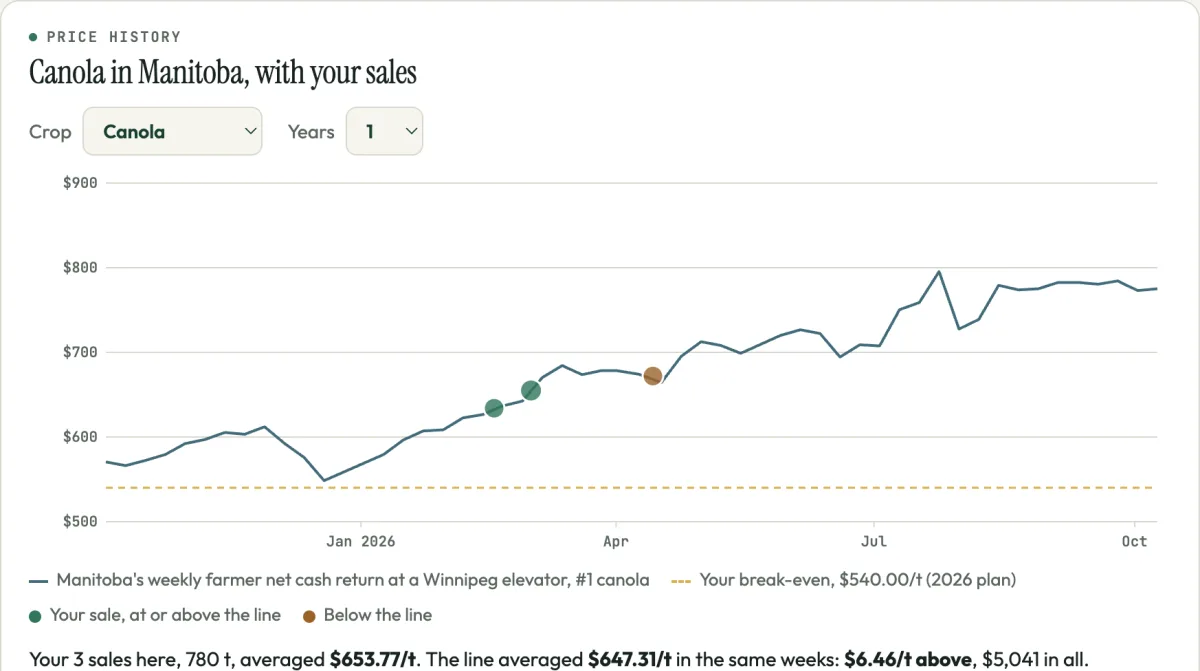
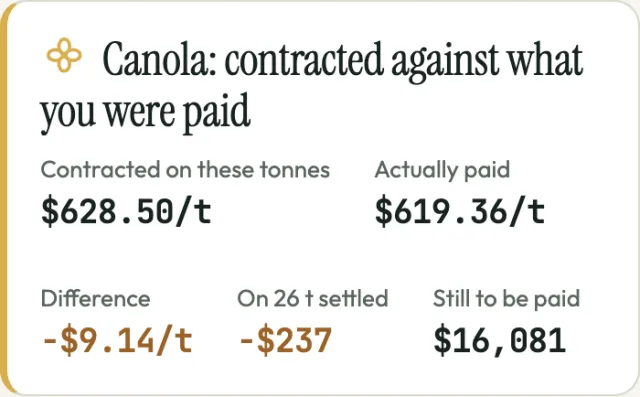
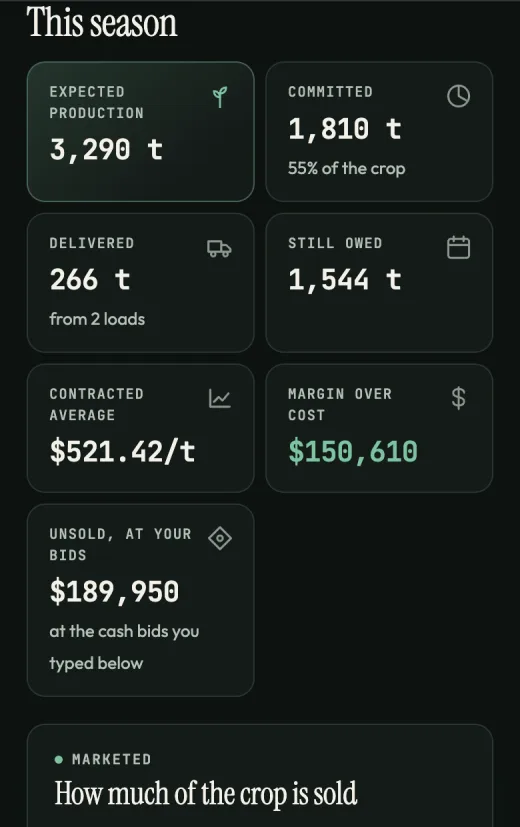
Yes, as a record of where prices have been. For a crop with no bid typed in, the app shows the average price farmers in your province received, from Statistics Canada, with its month. Saskatchewan, Manitoba and Alberta farms also get their province's weekly price, with the week's move and what it comes to on the grain you haven't sold, as an indication at that reference price, and the bid you typed against it. The Prices tab draws a crop's price over up to ten years with each of your sales on it, against the price that week, and your break-even, and this crop year against the last ten, each measured from its August start. The same prices are free on the Saskatchewan, Manitoba and Alberta price pages. It doesn't have live elevator bids or futures, but you can keep the bids you get when you call around: the app ranks them by what they come to at your farm after your freight, Plan a sale shows what taking the best one does to your book, and Hold or sell now shows what a later month's bid pays over the best for now after your own storage and interest. It never says when to sell. Plan also compares your contracted average and net settled average across crop years, with the tonnes behind each. These exclude unsold grain and reference prices.
Does it email me?
Once a week, on Monday mornings, and only when there’s something in it: what’s due in the next two weeks, money still to come on unpaid settlements, settlement lines still to check, and each crop’s sales against your bid, target and break-even. For farms in Canada it adds the Statistics Canada provincial average price (about three months behind, shown as a reference), for Saskatchewan and Manitoba farms the province's weekly price, what the week's move comes to on the grain not yet sold (an indication at that reference price) and when it reached or fell below the target price you set, and any Canadian Grain Commission licence notice for a buyer on your contracts or settlements. It gives no advice to sell or hold. New accounts choose whether to receive it at signup or in Settings. Existing email preferences are kept. Anyone can turn it off in Settings or with the link in the email. It doesn’t have live elevator bids or futures.
Do I have to type every contract in?
No. Take a photo of the contract or open its PDF, and GrainPosition reads the buyer, contract number, crop, quantity, price and delivery dates into the form. Anything it wasn’t sure of is highlighted, and nothing is saved until you’ve checked it. Scale tickets and settlements work the same way, and a settlement is checked against its own gross. The file is sent to Anthropic's Claude to be read; GrainPosition does not archive it on its server. Offline capture can keep a device-only copy until it is read. See the device storage details.
Can I import my current spreadsheet?
Yes. In the app, pick the free workbook from this page or your own Excel or CSV file. Contracts, bins and expected production come across. The workbook's columns are known; for your own spreadsheet the columns are matched for you, and you check the matching and every row before anything is saved. A layout it can't read, like landlords down the side and yields across the top, you can send to me instead.
Can I move over from another app?
Yes. Most grain apps can export your contracts to a spreadsheet or CSV. Import that file here and the columns are matched for you, and you check every row before anything is saved. Or send me the export and I’ll set up your book for you; I’m doing that myself for the first 30 farms.
Can my family, an employee or my accountant use it?
Yes. From Settings, invite them by email and choose what each can do. Family can do everything except invite or remove people. An employee logs scale tickets, bins and harvest and never sees prices, settlements or costs. Read only suits an accountant or banker: they see everything and change nothing. A grain marketing advisor sees everything and keeps your contracts, crop plan and bids up to date, but not your loads, settlements, bins or costs. Each person has their own sign-in, with no passwords, and you can change or remove anyone at any time.
Can I plan by field and track what the crop costs?
Yes. Add each field with its acres and expected yield and the crop’s expected production adds up from them. Put in a budget per acre (seed, fertilizer, chemical, land and the rest) and you see the cost per tonne, which is your break-even price. Through the season, record what you spend and what each field harvests, straight into a bin if you like, and see spending against the budget, each field against its plan and the actual cost per tonne. It isn’t agronomy software: no spray records or field maps.
Does it show the weather, or how a short crop hits my contracts?
Yes, for farms in Canada. Pick the farm's nearest town and the dashboard shows the season so far at the closest Environment and Climate Change Canada station still reporting every day: rain over the last 7 and 30 days and since May 1, drawn against the average as the season goes, growing degree days, and the last spring and first fall frost, each against that station's own record for the same dates over up to 15 past seasons, with the station's name and distance. Beside it, the Canadian Drought Monitor's category at your town, and each crop's contracts against what you expect to grow: how much is contracted, and what would be left, or short, if the yield came in 10, 20, 30 or 40% under. From May to September the Monday email adds the week's rain at that station. One station isn't your fields, so it never guesses your yield; the expected yield is the one you set on the Plan.
Can I track grain inventory by location?
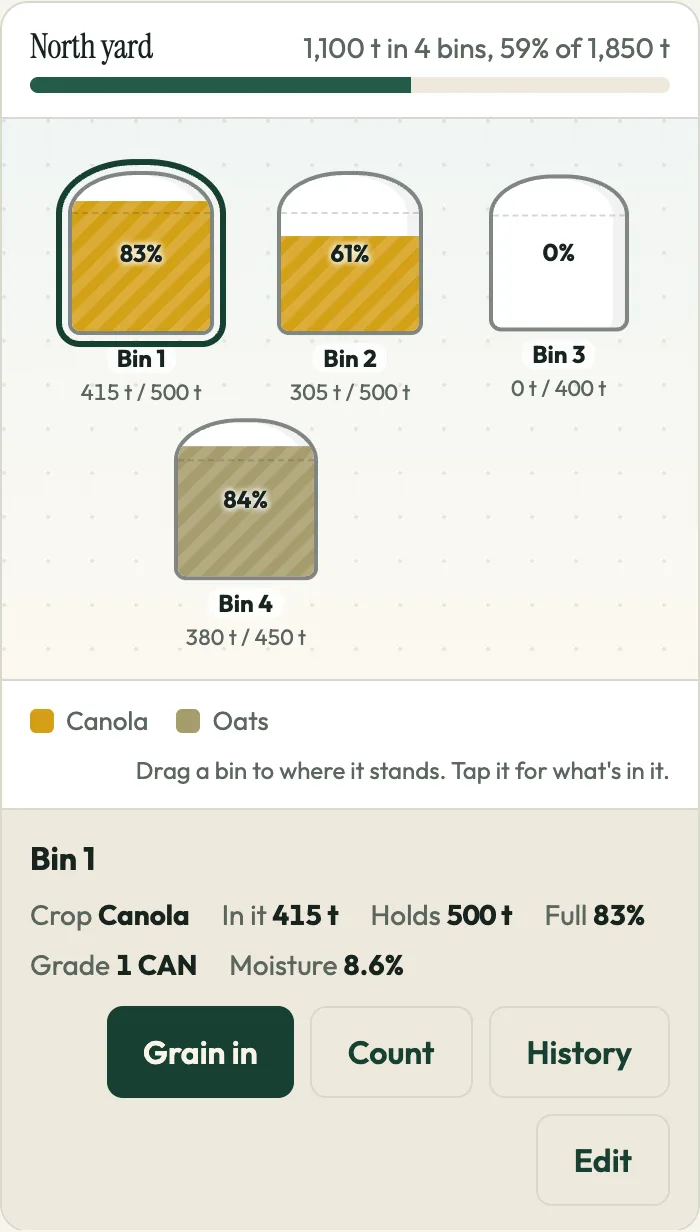
Yes, by yard or bin site. In the app each yard is a map: drag every bin and grain bag to where it stands, and each fills to how full it is, in its crop's colour, with the grade, moisture and protein of what's in it. You also see the total of each crop on hand across the farm. Log a check on any bin (the grain's temperature, moisture and a note), and each bin shows where its moisture falls in the Grain Commission's grading limits for the crop: tough canola from 10.1%, for example. Walk the yard guides you through occupied bins in yard-map order, showing earlier readings separately. Printable QR labels open a bin after farm sign-in. Inventory as of a date shows recorded physical balances independently of crop-year reporting, starting from a known opening balance. Earlier unknown balances are not inferred. A dated bin-to-bin transfer changes both bins together while preserving the farm total, without recording a sale or delivery. Temperature and moisture charts show recorded checks in separate grain periods, with older unassigned readings kept separate. Its check form includes the outside-air forecast for that bin's crop, recorded moisture and recorded or clearly assumed grain temperature. A tough or damp bin comes up in Coming up and the Monday email every 14 days, or as often as you set, with its value at your bid.
Can I offer grain to buyers through GrainPosition?
Yes, in early access. In For sale, offer a load: crop, tonnes, grade and test results, when it can move, and the town to show it near. Once GrainPosition has looked it over, it goes on the public board at grainposition.com/grain-for-sale without your farm’s name or exact place, and to grain buyers on GrainPosition’s list whose area and crops it fits, if there are any. Buyers bid from a link, without an account, and you see every bid side by side with whether the buyer holds a Grain Commission licence and what each comes to at your farm after your trucking cost. Nothing is agreed until you pick a bid; then you and that buyer get each other’s details and write the contract between you. GrainPosition doesn’t buy, sell or handle grain or payment, and doesn’t tell you whether or when to sell. Selling to a buyer that isn’t licensed is at your own risk, with no payment protection.
Does it work with my grain marketing advisor?
Yes. Your advisor asks to work with your farm, or you invite them from Settings. Nothing is shared until you say yes. They see your whole book and can keep the marketing side up to date: contracts, the crop plan and bids. Your loads, settlements, bins, costs and the people on your farm stay yours, and you can remove them at any time. An advisor with several farms sees them side by side on one Clients screen: how much each has sold and at what average, what's unpriced, deliveries due, settlements unpaid and settlement lines to check, and every farm added up by crop. Futures and options aren't tracked yet. More for advisors.
Can I give my banker a report?
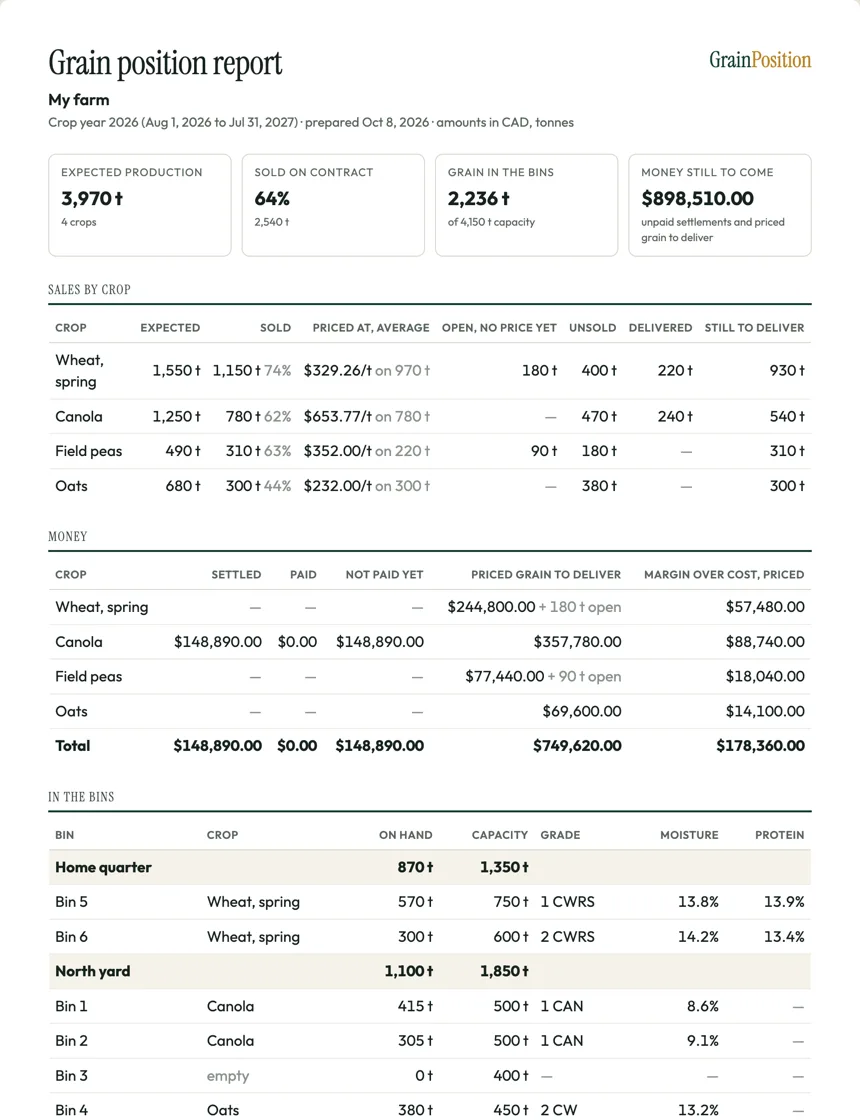
Yes. In the app, the Bank report puts the crop year on one page: expected production, what's sold and at what average, open and unsold tonnes, deliveries, money settled, not paid yet and still to come from priced contracts, when that money should come in by month, margin over your cost of production, unsold grain at your cash bids (or, where you typed none, the average price farmers in your province received, from Statistics Canada), and every bin with its grade and moisture. Print it or save it as a PDF. It says it was prepared from your own records and isn't audited.
Does it handle bushels or only tonnes?
Both. You pick the unit and the whole app follows, including prices. The sample farm has the same toggle, so you can see exactly how it reads in either unit.
Which crops does it handle?
Corn, soybeans, grain sorghum, canola, spring wheat, durum, barley, oats, rye, field peas, lentils, flax, sunflowers, dry beans, chickpeas, mustard seed and canary seed, each with its own bushel weight so the unit toggle is correct for that crop rather than roughly right. If you grow something that isn’t there, say so when you ask for access and it goes in.
What about open and basis contracts where the price isn’t set?
Each contract says how it’s priced: fixed, basis (basis set, futures later), futures only (HTA), price later, averaging or managed by the buyer, or minimum price. Until the price is set, the tonnes count as committed and stay out of the weighted average, because they’re sold even though the money isn’t. A basis or futures-only contract with one leg set shows as half priced. Once both legs are in, the flat price is worked out for you: ICE canola in dollars per tonne, and US-dollar wheat futures at the exchange rate on the contract. The date it must be priced by goes in Coming up, and so does for farms in Western Canada, the end of the Grain Commission’s 90 days of payment protection on grain delivered but not priced yet. It doesn’t track futures or options at a broker yet.
Can it handle more than one farm or legal entity?
It’s one farm per account for now. If you run several entities and need them separated, say so when you ask for access. That input is what decides whether it comes early or late.
Who can see my contract prices?
You, and anyone you give your login to. Your numbers aren’t aggregated into market data, sold, or shared with buyers or lenders. Export is one button if you want to hand a file to someone yourself.
What happens if I stop paying?
Your book stays there, read-only: you can still see it and export everything, you just can’t add to it. Nothing is held hostage, and the export is a plain CSV you can open anywhere. You can also delete it all yourself, any time.
What happens to the price after launch?
It goes to $349 a year, or $35 a month, in Canadian dollars for farms in Canada and US dollars for farms in the US. Farms that join during early access pay $249 a year, or $25 a month, and keep that price for as long as the subscription runs without a break. If the price moves again later, founding farms stay where they are.
When can I use it?
Now, in free early access. Put in your email and a sign-in link opens your book straight away. Start by checking one sale: photograph a contract and the settlement that paid for it, and each line gets checked. Or see one checked on a sample farm first, or start with your own records. Or send me your spreadsheet and I’ll set up your book for you, as I’m doing for the first 30 farms. Early access farms get told what’s working, what moved and what slipped, in plain language.
What’s coming next, and what won’t it do?
Next: photos with scouting notes, and a year-end worksheet laid out the way the CRA’s farming income form is. Deliberately not: bookkeeping, invoicing and payroll; agronomy advice, such as what to spray or when; market advice or price recommendations; and anything that needs a two-day onboarding call. Early access farms are told what moved and what slipped, in plain words.
Does the AI assistant change my records?
No. Ask GrainPosition is in its first version. When enabled, it answers read-only questions using permitted farm records and existing calculations, including a farm overview of fields, crops, acreage, production and inventory. It links to supporting screens. Questions and relevant record details are sent to Anthropic only when you submit them after confirming in the assistant.
Can I capture documents without a connection?
Yes. Open your book online once on this device to prepare offline capture. Contract, ticket and settlement photos or PDFs can wait on the device for up to 7 days. Reconnect and choose Read, then review the proposed fields before saving. Nothing uploads or books automatically. Private farm records and document reading still need a connection. Keep your originals; signing out clears the device queue.
Can I try the bin yard without an account?
Yes. The free bin yard map lets you arrange bins, track grain in and out and keep notes without an account. Use Record movement or tap a bin to add or remove grain. Recent activity shows local movements. Use Arrange yard to move bins; positions stay locked during normal tracking. It saves in your browser, with backup download and import. Sign up or sign in to add a snapshot of your bins, notes and current amounts to your farm. The app is free during early access.
Is the sample farm real software?
Yes. “Look around a sample farm” opens the real app on a made-up farm, West Ridge Farm near Glenboro, Manitoba, with every tab and every form. Nothing you enter there is saved, and it isn’t anyone’s real farm: every name and figure is fictional. You can explore it while signed in and return to your own book without signing out. The optional tour points out the actual grain position and settlement check.