For grain marketing advisors: every client farm on one screen
Each farm keeps its own grain book: contracts, bins, scale tickets and settlements. Your clients let you in, and one Clients screen shows how much each has sold, at what average, what's still unpriced, which deliveries are due, and which settlements paid less than the contract said.
Built in Winnipeg by Ruslan Glick. Live in the app since 13 October 2026, in early access, so no advisor has used it for a season yet. Tell me what's missing and I'll build it.
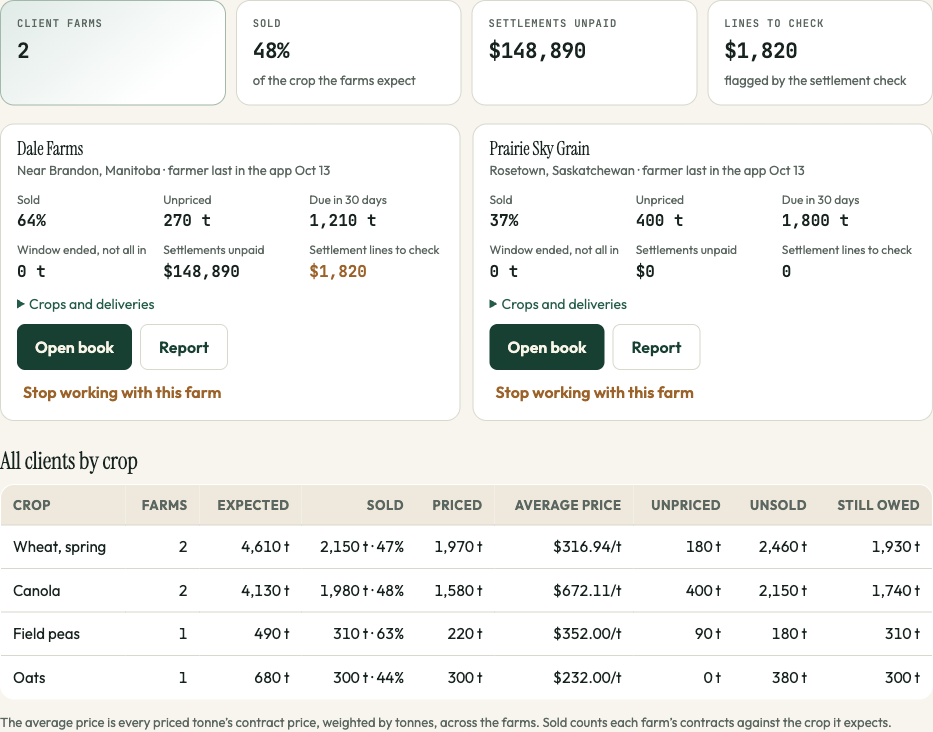
What's on the Clients screen
- Each farm, for the crop year you pick: percent of the expected crop sold, unpriced tonnes, deliveries due in the next 30 days, delivery windows that ended with grain still to haul, settlements not paid yet, and settlement lines flagged for checking.
- All your clients added up by crop: expected, sold, priced, the average contract price weighted by tonnes, unpriced, unsold and still owed. Canadian and US farms are added up separately, in their own currency.
- Open any farm's book to update its contracts and plan, or print its report: one page with what's sold and at what average, what's unsold, the bins, and money paid and still to come.
Settlements checked against the contract, on every client
When a settlement comes in, GrainPosition checks it line by line against the contract and the scale tickets: the price, the grade, dockage, freight, drying and each deduction. Lines that don't match are flagged, and you see the total for every client farm on one screen. No buyer funds GrainPosition, so the check works for the farm and not the buyer. How the settlement check works.
How a farm lets you in
- You ask from the Clients screen with the farmer's email and a short note. Or the farmer invites you from Settings, People on this farm.
- The farmer says yes or no in the app. Nothing is shared before a yes, and only the farm's owner can say it. A farmer new to GrainPosition gets their own book, free in early access.
- The farm shows up on your Clients screen. The farmer can remove you at any time, and you can stop working with a farm from the same screen.
You can
- See the farm's whole book
- Add and change contracts, or read them from a photo or PDF
- Keep the crop plan up to date: acres, yield, fields, budget, break-even, target
- Type in cash bids, and try what a buyer's offer would do
- Print the farm's report
The farm keeps
- Loads and scale tickets
- Settlements and their checks
- Bins, costs and farm settings
- Who else is on the farm
What it doesn't do yet
Futures and options aren't tracked next to the physical sales yet. That's planned next: basis and futures-only (HTA) contracts counted as half priced, a log of futures and options trades linked to each crop year, and a warning when sold plus hedged grain is more than the farm expects to grow. If your clients hedge, I'd like to hear how you track it now. There's also no app in the app stores (it runs in the phone's browser and installs on the home screen), and no connection to FieldView or a broker yet.
Questions advisors ask
Can my clients' farms see each other?
No. Each farm sees only its own book. Only you see your client farms side by side, and the Clients screen adds up only the farms that let you in. GrainPosition doesn't pool or share farm records with anyone.
What can I change on a client's book?
Contracts, the crop plan (acres, expected yield, fields, budget, target) and the cash bids. You can read contracts and buyers' offers from a photo. Loads, settlements, bins, costs, farm settings and the people on the farm stay with the farm. The server checks this on every request.
What does it cost an advisor?
Your own login is free. Billing is per farm, and an advisor never pays to see a client's book. Farms are free during early access; after that the founding price is $249 a year, in CAD or USD.
Does it track futures and options?
Not yet. Contracts, sales, bins, deliveries and settlements are tracked today. Futures and options next to the physical sales are planned next, and the first advisors who use it will shape how.
Does GrainPosition tell farmers when to sell?
No. It shows each farm's position and what a sale would do to it; the marketing advice stays yours.
Try it with one client
Sign in with your email (no password), open Clients from Settings, and ask one farm to let you in. Or email me and I'll set it up with you.
Open the appEmail RuslanComparing tools? GrainPosition and Combyne compared, including where Combyne is the better choice, and grain marketing software compared.